Join us for our Christmas Galore Link Party! Come share your awesome ideas for Christmas decor, party ideas, recipes, activities and anything else!!

While you're here, be sure to enter our giveaway for Shutterfly and Plum District Goodies! The giveaway has been extended to December 2nd and there will be 5 winners!


Friday, November 11, 2011

Harvest Party Features - Round One!

Sorry it's been so quiet around here again this week. I'm getting ready to host a Shutterfly party this weekend and my house needed a little TLC in order to be party-worthy. I've also been a little inundated with orders this week and trying to get some new gift sets posted. Which is good for me, but it means that this poor little blog gets a little neglected. Hopefully after the party (and while my house is still clean), posting will resume as normal and I can get back to some projects I've been itching to get to!

Also, while I've got you here, don't forget to go enter the giveaway for the My Memories Digital Scrapbooking Software. I'm really loving this software, seriously! And there are only a few entries so far, so your chances of winning are pretty good!

Now, on to the features. First of all, thanks to everyone who has linked up so far to the Harvest Party! There will be a few rounds of features through the month of November, so keep on linking up your awesome projects!

First up are these cute little PB Knockoff Metallic Pumpkins from ReMade Simple. I love the look of the silver and the orange and how the orange is peeking through. So cute!


Even though I'm not a huge fan of pumpkin pie (blasphemy, I know), I enjoy other things made with pumpkin, so I'm totally digging this Round Up of Pumpkin Recipes from Crumbs and Chaos!


Looking for something fun to do with your kids for Thanksgiving? I love the idea of creating Thanksgiving Potholders that show off the kiddo's handprints. What a fun keepsake! Thanks to Pampered by Tammie for sharing!


If your idea was featured, be sure to grab the featured button from the sidebar to the right! Have a great weekend!


Photobucket

Wednesday, November 9, 2011

Inspired by Pinterest - Using Canning Rings

Like most of you, I'm on Pinterest. I wouldn't quite call myself addicted, but that's probably because I just don't have time! Anyway, one of the things that I thought would be fun to do would be to try out some things that I've found on Pinterest and see how they work.

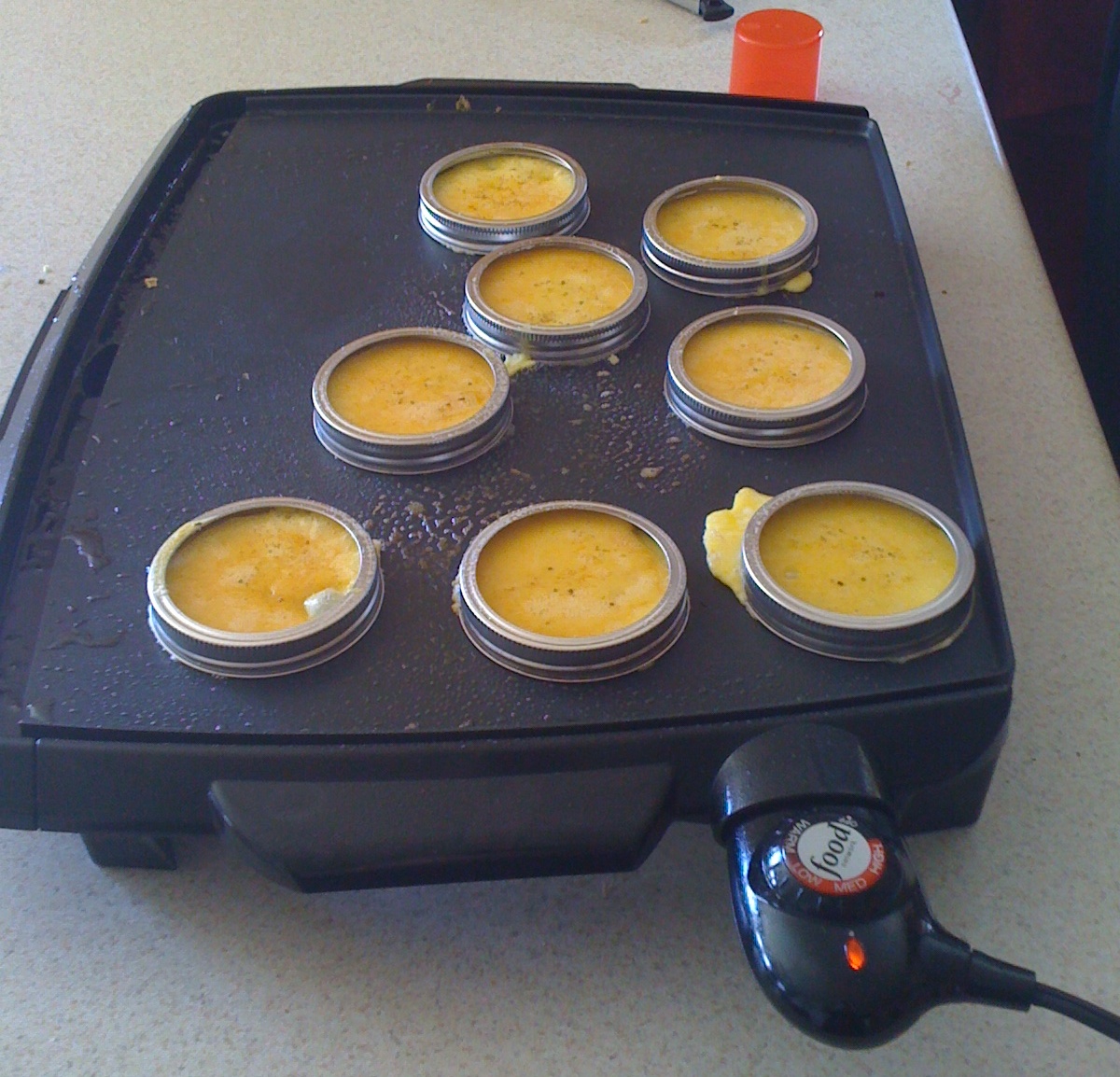
So, for our first week - Using Canning Rings to cook Eggs.


Pinching Your Pennies
I saw this idea and thought it was perfect! We love making our own homemade breakfast sandwiches. I've been making them for years - since about 2004 when I'd moved out on my own and couldn't afford McDonald's breakfasts anymore! Anyway, I can easily make the eggs in a square shape to fit on toast, but I have yet to find a way to make the eggs round to fit nicely on a biscuit or english muffin.

I coated the whole ring in cooking spray and let it preheat with the pan on medium heat. In went the egg and it immediately started oozing out under the rings. I had to hold down the rings as I poured the egg inorder to get it to not ooze. I let them cook for a couple of minutes and then the bottom was starting to get a little golden so I decided it was time to try and turn it. And maybe that was my mistake. Maybe I turned it too soon, but I could not get it to come out of the canning ring. I had to practically rip it out. The part of the egg that wasn't completely done spilled all over the pan. I was able to salvage it and it still tasted it the same, but it wasn't easy.

I haven't given up hope. I'll try again, I think. Has anyone else tried this? Any tips or tricks that I'm missing?

Photobucket

Tuesday, November 8, 2011

Digital Scrapbooking Freebies from My Memories

Have you all entered the giveaway for the My Memories Digital Scrapbooking Software? The more I use it, the more I learn about how awesome it is! Thinking of purchasing the My Memories Digital Scrapbooking Software? Be sure to use the code STMMMS51889 at checkout to get $10 off the software and an additional $10 to spend in the MyMemories.com store.

My Memories wants to share some freebies with the LITM readers! The good news about these freebies? They're .png and .jpg files, so they can be used with any editing or graphic software! In fact, one thing that I've learned about the files that I've purchased from My Memories is that all the packs of embellishments, papers, and templates can be downloaded on to your computer to be used with any graphic software. How awesome is that?!

Anyway, on to the goodies!


When you download the freebie pack, you'll get the two-page layout Quick Page files, plus all the papers and elements use to create the pages. How's that for awesome!? Click the picture or link above to access the download.

This particular freebie will only be available for a short time, so if you want it, go get it now! But, you can look forward to new freebies from My Memories every week. Yay for that! You'll be able to easily (and cheaply) grow your digital scrapbooking supply and you'll get your pages scrapped quicker with the Quick Page layouts!!

Hope you enjoy!!

Photobucket

Saturday, November 5, 2011

A Call for Guest Posts

 There are some awesome things that are in the works for this little blog and I need your help!

First of all, There is going to be a new series called "Extraordinary Women" starting on November 18th! This is a series that will feature a different extraordinary woman twice a month. We're looking for women who have faced their struggles with courage, who have beaten the odds, and, most of all, who have endured their trials and lived to tell about it! It doesn't need to be something life shattering - maybe just life changing. Does that make sense? If you, or someone you know, would be willing to share your story with the LITM readers, then pretty please fill out the form below and we'll get things set up!

And second on the list - we'll be hosting a Handmade Gifts series! For a week in November, your projects are going to be featured on our blog. Projects that would make good handmade gifts for anyone. Projects are needed specifically for the following groups: Infants & Toddlers; Preschoolers; Big Kids (ages 5-11ish); Tweens & Teens; Spouse or Significant Other (since most of the people who read this are moms, we're especially interested in things for the men folk); and Neighbors, Friends & Co-Workers (this is where I see projects for the ladies going). This series will run November 14th - 19th. Guest posts with unpublished projects would be awesome, but this blog is still growing, so any and all already published projects are welcome too! My hope is to be able to feature every single submission that we get - so PLEASE, submit your projects! Anything new, old, published or otherwise will be AWESOME! Just make sure that it's something that is a handmade project, that was made by you, and that fits with one of the categories above.

So, what are you waiting for? Fill out the form below and let me know what you'd like to share with our readers!


Photobucket

Friday, November 4, 2011

Train Name Plaque for the Boy

Because Andyroo loves trains, here's yet another fun train project, just for him.

It was super easy and took me all of an hour to complete. And it only took that long because I kept getting interrupted.


I found the wooden train plaques (I actually purchased 2 - not sure how I'm going to use the other one) on clearance at Hobby Lobby. I found a cute train paper, traced the train shape, and mod podged that baby on. I used my Silhouette to cut out Andyroo's name and there you have it.

Easy peasy. And cheap too!

Thanks to all the fabulous bloggers out there who take the time and effort to host these spectacular parties!! We're linking up here:


Mondays:
Just Something I Whipped Up, Craftastic Monday, Turquoise Lovin', Making the World Cuter Mondays, Making Mondays Marvelous, Creative Me Mondays, Made By You Mondays, Craft-O-Maniac Monday, Made with Love, More the Merrier


Tuesdays:
Get You Craft On, Tuesday Confessional, Who's Got Glam, Ta-Da Tuesdays, Tip Me Tuesdays, Take a Look Tuesdays, Show Me What You Got, Tuesday Tutorials, Too Cute Tuesdays, Craft & Tell, Tutorials & Tips Tuesday


Wednesdays:
Whatever Goes Wednesday, Idea Sharing Wednesday, What I Made Wednesday, DIY Under $5, Woot Woot Wednesday, Wow Me Wednesday, Your Whims Wednesday, Lil' Luna Link Party, Hoo's Got Talent, We Can Do it Cheaper, Look What I Made, What I Whipped up Wednesday, Wow Me Wednesday


Thursdays:
Strut Your Stuff, DIY Diva Thursdays, Hookin' Up With House of Hepworths, Get Your Brag On


Fridays:
Frugal Friday, Creative-ly U, Feature Yourself Friday, PityParty, Look At Me, Show & Share, Fantabulous Friday, Tickled Pink Fridays, I'm Lovin' It


Saturdays/Sundays:
Lovely Little Linkup, Weekend Wander, Sundae Scoop, Sunday Showcase Party, Think Pink Sundays, Anything Goes, Whatcha Got Weekend, Free For All

Photobucket

Thursday, November 3, 2011

My Memories Software Review + Giveaway!

I've seen other reviews and giveaways around blogland for the My Memories Suite Software and I've really wanted to check it out. So needless to say, when we were contacted by My Memories to review their software, I couldn't refuse!


I used to be really big into scrapbooking - it was my creative outlet! I was able to keep up with it after Hubs and I got married for a while. I finished our wedding album, but my scrapbooking habits died off pretty soon after. We were in a tiny little apartment and it's hard to scrapbook when you have no room to work - when you have to pick up everything each time and pull everything out again to start over. It's not very fun! And even though we have a bit more room now, I still couldn't leave things out because Andyroo would get into them. And to be honest, purchasing scrapbook supplies is...expensive! Even when I worked at Michaels and could take advantage of the employee discount, it was still expensive and just not something that we could really afford.

Needless to say, Andyroo's scrapbook has become very neglected. I purchased the album and completed about 4 pages. In 3 years. Terrible, I know. I've made a few photo books over the years to compensate for the lack of scrapbooks, but those can be expensive too. Don't get me wrong, they're worth it, and less expensive than scrapbooking. However, for the most part they're generally uncustomizeable, which is a huge downside.

I've wanted to venture into the digital scrapbooking world for sometime, but didn't know where to start or which scrapbooking software to use - and I've found that the My Memories Suite is the perfect place for a newbie like me. It would also be a great addition to any seasoned digital scrapper.

Check out a few of the layouts I was able to create - and in MUCH less time than it takes to pull out the scrapbooking stuff and come up with a layout that I like. I decided to start on Andyroo's scrapbook, and look at what I was able to come up with in just a short time! Seriously, soooo much fun!!! And, don't laugh. This was my first time ever attempting digital scrapbooking. I'll get better, I promise! :)


Besides scrapbook layouts, there's so much more that you can do with the My Memories Suite. I'm hosting a Shutterfly House Party later this month and I wanted a physical invite to hand out to some friends. I switched to an 8.5x11 layout, grabbed the logos from the House Party website, and quickly made up my own invitation.
Besides that simple little invitation, you could create announcements (birth, graduation, wedding, etc), holiday cards, photo books, and so much more. You have full creative control! I'm also really excited to try out the feature to make a slide show complete with music. I see lots of creative fun in my future!

I could go broke buying all of their cool design packs. I'm currently  (working on scrapping all of Andyroo's pictures, so I'm loving the All Boy pack, the What Are Little Boys Made Of pack, and the It's a Boy Thing pack. Super cute stuff!

Alas, most of them will have to wait until Hubby gets his promotion. In the meantime, they have a bunch of awesome freebies and - my favorite part - you can even use digital elements that you may already have on your computer! Yay for that!

And now here's a goody for you! My Memories wants to give one lucky reader a copy of this awesome digital scrapbooking software. Here's how you can enter to win your very own copy:
  • Be a follower of Life in the Motherhood
If you'd like additional opportunities, you can do any of the following.
  • Pop on over to MyMemories.com and come back and let us know what your favorite item (bundle, font, package, etc) is. I promise you'll want to immediately start adding things to your wish list!
  • Visit Life in the Motherhood on Facebook and give us a like
  • Visit My Memories on Facebook and give them a thumbs up - plus you'll get a freebie just for liking them!
  • You can also follow My Memories on Twitter, if you prefer that social media avenue 
  • Share this giveaway through whichever social avenue you prefer - Facebook, Twitter, Google +, etc.
Make sure to leave a separate comment for each thing you do so that each entry will be counted. And pretty please make sure that I can either contact you through your profile or leave your email addy in your comment so that you can be reached if you're the winner.

The giveaway will be open from Thursday, November 3rd through midnight on Sunday, November 13th. A winner will be announced the following Monday (the 14th).

Are you excited to get started and you don't want to wait for the giveaway? You can order your very own copy right now and have it downloaded in minutes! My Memories was cool enough to give LITM readers a code to get $10 off the price of the software and $10 to spend in the MyMemories.com store. Just use the code STMMMS51889 for all this scrapbook goodness!

Good luck!

(I was provided a free copy of the software so that I could use and review it. I was not told how to review the software or what to say. The review of this software is my own opinion)

Photobucket

Tuesday, November 1, 2011

Harvest Party Link Up

Halloween is over we just don't want the party to end. So of course, we need a new party! We knew you'd agree! How's about a Thanksgiving/Fall themed party?


Photobucket

<a href="http://lifeinthemotherhood.blogspot.com"><img src="http://i232.photobucket.com/albums/ee81/mrsdupree819/HarvestPartyButton150.png" border="0" alt="Life in the Motherhood"></a>


Just a few suggestions before joining the party...

1. We'd love it if you would be a LITM follower. You can join us through GFC, Facebook, Feedburner, and we're even both are on Pinterest!
2. We'd also really appreciate it if you would link back to us so that others can join the fun too. If you really loved us, you'd grab one of our awesome buttons (either the Harvest Party button above or the LITM button from the sidebar) :)
3. Remember to link to your specific post and not just to your blog. And please, no Etsy shops or giveaways. However, Pinterest boards are permitted :)
4. There's no limit to how many posts you can link up - we'd love to see everything you've got! Just make sure they're Fall or Thanksgiving related. Also, if you shared something in our Halloween party that could also be "fallish," feel free to link it up again!

Let the feasting begin!


Photobucket
                            &
Photobucket
Related Posts Plugin for WordPress, Blogger...